NVISAGE N1 Launch Monitor SIG Golf Simulator Enclosure Projector Package
Original price
$8,290.00
Original price
$7,700.00
-
Original price
$13,950.00
Original price
$8,290.00
Current price
$8,230.00
$7,580.00
-
$13,810.00
Current price
$8,230.00
| /
The #1 Authorized Golf Retailer
We're proud to be the USA's #1 Authorized retailer for high quality golf brands
Price Match Guarantee
Found a lower price elsewhere? Let us know, we’ll match it or beat it!
No Sales Tax & Free Shipping
Enjoy no sales tax and free shipping on most orders (exclusions apply) on products from leading manufacturers!
Qualified & Real Human Support
Questions? Give us a call to speak with a golf expert 571-500-8371
Description
The NVISAGE N1 Launch Monitor SIG Golf Simulator Enclosure Projector Package combines the SIG Golf Simulator Enclosure with Impact Screen, your choice of projector, and the NVISAGE N1 Launch Monitor for a complete indoor golf simulation experience. Choose from SIG8, SIG10, or SIG12 enclosure sizes and BenQ, LG, Epson, or Optoma projectors to suit your space and preferences.
What's Included
SIG8, SIG10, or SIG12 Golf Simulator Enclosure with Impact Screen (selected size and screen)
NVISAGE N1 Launch Monitor
Choice of BenQ, LG, Epson, or Optoma projector
MURLIE-X Course Play Software with 20 included golf courses and no subscription required
Optional Accessories (Sold Separately)
Landing Pad Mat for SIG Golf Simulator Enclosure
SIG Golf Simulator Baffle Accessory
SIG Golf Simulator Blackout Screen
Hitting Mat
Putting Turf
Projector Mount
Gaming PC or Laptop
Before Purchasing: Please review the Specifications tab to confirm that the overall dimensions of your selected enclosure will fit your available space.
Please Note: The BenQ AK900ST projector is on pre-order until late October 2026, while the BenQ AK800ST projector is on pre-order until mid-November 2026.
Product Features
Dual Impact Screen Options
Choose between the SIGPRO Premium (White) and SIGPRO Premier (Gray) Impact Screen to find the option that best suits your performance needs and budget.
Testing demonstrated the SIGPRO screen's superior durability compared to competing screens, along with reduced noise and ball bounce-back. The screen features double-stitched black vinyl edges and grommets for easy installation using the included ball bungees.
Full-Screen Projection
The SIG10 and SIG12 enclosures allow the projected image to fill 100% of the screen, while the SIG8 is designed to minimize white space and maximize the usable projection area for a more immersive golf simulation experience.
HD Visuals and Lasting Durability
Designed to withstand ball speeds of up to 250 MPH, the impact screen delivers high-definition visuals and reliable long-term performance.
Premium Surround Finish
Complete your simulator setup with the SIG Surround, designed to fit seamlessly around the enclosure for a clean, professional appearance. Crafted from durable vinyl, the surround enhances the overall look of your simulator space. The included 6-inch ball bungees securely attach the impact screen and nylon surround to the enclosure frame.
MURLIE-X Course Play Software Included
The NVISAGE N1 includes MURLIE-X course play software at no additional cost, with no subscription required. Enjoy 20 included golf courses and go beyond the driving range to play full rounds on virtual courses right out of the box.
Overhead Launch Monitor Design
The NVISAGE N1 is designed for overhead mounting, keeping the launch monitor out of your swing path and allowing more room for uninterrupted practice. The optional NVISAGE Frame Mount lets you securely attach the device directly to your golf simulator enclosure frame for a clean, space-saving setup.
High-Speed Cameras for Detailed Swing Analysis
Analyze every detail of your swing with the NVISAGE N1's advanced sensor technology. Featuring high-speed cameras and the PhysX 6D Physics Engine, the launch monitor captures key swing and ball data to help you better understand your performance and improve your game.
Spacious Hitting Zone
The NVISAGE N1 features a 24-inch-deep by 20-inch-wide hitting zone, providing ample space for ball placement and comfortable practice. Its design also offers greater mounting flexibility, making it suitable for simulator setups with limited space.
Short-Throw Design for Compact Golf Bays
Every projector in this lineup features a short-throw or ultra-short-throw design, allowing it to project onto a full-size impact screen from a closer distance while keeping the projector out of your swing path. The Epson L695SE offers a throw ratio of 0.5–0.7, while the LG ProBeam BU53RG can project a 150-inch image from approximately 10.3 feet away. Select models also feature optical zoom, lens shift, and geometric correction, providing greater flexibility to align the projected image with the screen without relocating the projector mount.
Laser Light Source Brightness and Longevity
Every projector in this lineup uses a laser light source, eliminating the need for lamp replacements and delivering consistent brightness over time. Rated light source life ranges from 20,000 hours on the BenQ LK936ST and LG ProBeam BU53RG to 30,000 hours on the Epson L695SE, providing long-lasting, low-maintenance performance. With brightness levels ranging from 3,500 to 6,000 lumens, these projectors deliver vivid greens and fairways, even in rooms with the lights on.
4K and Full HD Resolution Options
Choose the resolution that best fits your screen size and budget. True 4K UHD projectors, such as the BenQ AK700ST and LG ProBeam BU53RG, deliver 8.3 million pixels for four times the detail of Full HD. The Epson L695SE features WUXGA resolution with 4K Enhancement, allowing it to accept 4K content and display approximately 4.6 million pixels. Full HD 1080p models round out the lineup, providing sharp, bright images for smaller simulator bays where brightness and value are the main priorities.
What's Included
Included with Your Purchase:
SIG8, SIG10, or SIG12 Golf Simulator Enclosure with Impact Screen (selected size and screen)
NVISAGE N1 Launch Monitor
Choice of BenQ, LG, Epson, or Optoma projector
MURLIE-X Course Play Software with 20 included golf courses and no subscription required
Optional Accessories (Sold Separately)
Landing Pad Mat for SIG Golf Simulator Enclosure
SIG Golf Simulator Baffle Accessory
SIG Golf Simulator Blackout Screen
Hitting Mat
Putting Turf
Projector Mount
Gaming PC or Laptop
What's Measured
The dual 2,000 FPS cameras capture ball rotation and trajectory, delivering a realistic and immersive golf simulation experience powered by the advanced PhysX 6D Physics Engine. For optimal tracking accuracy, the NVISAGE N1 requires marked golf balls with a specially designed dot pattern.
Data Parameters (Using Marked Golf Balls):
Club Speed
Ball Speed
Launch Angle
Spin Axis
Horizontal Launch Angle
Back Spin
Side Spin
Total Spin
Software Compatibility:
The NVISAGE N1 requires compatible golf simulator software and supports the following options:
GSPro: Experience realistic golf simulation with stunning 4K graphics, lifelike ball flight and roll, and an active player community. Practice on downloadable courses, take on skills challenges, or compete in local and online matches across more than 300 courses.
E6 Connect: Use E6 Connect for golf instruction, driving range practice, leagues, and online events at commercial facilities. It also offers a fun way to enjoy casual golf games at home with friends and family.
Specifications
NVISAGE N1:
Dimensions: 21.8"L × 6.9"W × 4.9"H
Weight: 19.2 lbs
Mounting Location: Overhead
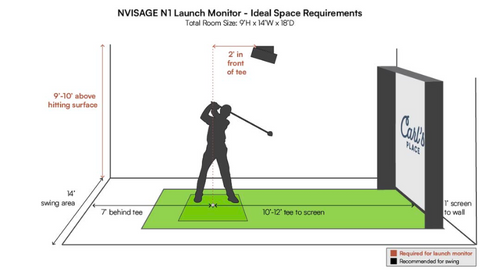
Recommended Mounting Position: 9–10 ft overhead, 2 ft in front of the tee
Hitting Zone: 24" × 20"
Cameras: Two 2,000 FPS cameras
Software Compatibility: GSPro and E6 CONNECT, with additional options coming soon
For easier enclosure assembly, we recommend leaving at least 2–3 inches of clearance between the top of the enclosure and the ceiling. Allow an additional 2–3 inches of space on each side between the enclosure and the surrounding walls.
PC Requirements: PC requirements vary depending on the third-party golf simulator software you choose. Please check the recommended specifications for your selected software to ensure compatibility.
Processor: Intel Core i5-8400 or equivalent
Memory: 8 GB RAM
Graphics Card: NVIDIA GeForce GTX 1060
AMD Processor Compatibility: 3rd-generation Ryzen or newer, such as the AMD Ryzen 5 3600X or higher. The AMD Ryzen 7 2700 is not compatible.
Operating System: Windows 10 (64-bit), version 1803 or later
Network Connection: Ethernet port required
Important Notes:
Apple iOS and macOS are not supported.
An NVIDIA RTX graphics card is highly recommended when using a 4K projector.
Space Requirements
Mount the NVISAGE N1 approximately 9–10 feet above the hitting surface and position it 2 feet in front of the hitting area.
For optimal setup, we recommend hitting from at least 10 feet away from the impact screen. With this arrangement, the NVISAGE N1 will sit approximately 8 feet from the impact screen.
FAQ
Q: What is included with the Uneekor EYE XO Launch Monitor SIG Golf Simulator Enclosure Projector Package?
A: This package includes the Uneekor EYE XO Launch Monitor, two Uneekor Swing Optix Cameras, two tripods, GSPro Software (limited-time offer), one year of AI Trainer (limited-time offer), a three-month Ultimate Package trial, your choice of SIG8, SIG10, or SIG12 Enclosure, your choice of SIGPRO Premium (White) or SIGPRO Premier (Gray) Impact Screen, color-coded push pin poles and connectors, protective foam padding, premium enclosure surround material, 6-inch ball bungees, and your choice of projector.
Q: How far should I stand from the impact screen?
A: For the safety of both the golfer and the screen, we recommend maintaining a minimum distance of 10–12 feet between the golfer and the impact screen.
Q: How much clearance is needed around the enclosure?
A: We recommend leaving at least 2–3 inches of clearance between the top of the enclosure and the ceiling to allow for easier assembly. Leave an additional 2–3 inches of space on each side between the enclosure and the surrounding walls.
Q: How much space do I need for the enclosure?
A: When planning your simulator setup, consider the enclosure's dimensions, clearance around walls and ceilings, launch monitor placement requirements, the recommended 10–12-foot hitting distance from the screen, golfer height, club length, turf thickness, and nearby furniture or doorways.
Q: What impact screen options are available for the SIG Enclosure?
A: You can choose between the SIGPRO Premium Impact Screen in white or the SIGPRO Premier Impact Screen in gray, depending on your preferences and setup requirements.
Q: Is the enclosure difficult to assemble?
A: Assembly is straightforward with color-coded push pin poles and connectors that make setting up the frame quick and intuitive. Detailed, step-by-step assembly instructions are also included.
Q: How long does enclosure assembly take?
A: Assembly typically takes approximately 1–2 hours, depending on the enclosure size and whether you have assistance. Refer to the assembly video and manual for additional guidance.
Q: Is all the necessary piping included for assembly?
A: Yes. The package includes push pin poles sized for your selected enclosure, along with the required connectors.
Q: What material is used for the enclosure surround?
A: The SIG Surround is made from durable vinyl, providing a clean, finished appearance and additional protection around the screen.
Q: What happens if a golf ball hits the black enclosure surround?
A: The black enclosure surround is not designed to withstand direct golf ball impacts. However, occasional contact from a ball rebounding off the impact screen should generally not cause issues.
Q: Are other sizes available in the Signature Series?
A: Yes. The SIG Signature Series offers SIG8, SIG10, and SIG12 Enclosures, allowing you to choose the size that best fits your available space while enjoying the same premium features.
Q: Where and how should I mount my projector?
A: Projector placement depends on your screen's viewable dimensions, aspect ratio, and the projector's throw ratio. Contact our team for guidance on the precise mounting location based on your selected enclosure size and projector model. Common mounting options include flush mounts and drop mounts.
When you shop with Indoor Golf Essentials, you get authentic products from trusted brands, full manufacturer warranty coverage, and lifetime customer support, so you can buy with complete confidence.
Customer Success Stories
my setup was a breeze and the quality blew me away for the price, My buddies and I use it every weekend, feels just like being out on the course.
Mike T. Verified Buyer
Customer support was top notch. They helped me pick the right setup for my space and even walked me through installation over the phone.
Robert L. Verified Buyer
Shipping was fast and everything arrived perfectly on time. The setup works flawlessly, super accurate readings and easy to use.
James P. Verified Buyer
I didn’t want to spend a fortune, and this setup delivered way more than I expected. Great quality and the team clearly knows their stuff.