Description
The FlightScope Mevo+ Launch Monitor is the ideal companion for golfers, coaches, instructors, and fitters—both indoors and out. Powered by FlightScope’s Fusion Tracking technology, this cutting-edge monitor and simulator delivers unmatched insights to refine your game and maximize enjoyment.
FlightScope’s proprietary Fusion Tracking blends 3D Doppler radar with high-speed image processing, ensuring accurate and reliable data for every shot—whether you're practicing inside or on the range.
Elevate your performance with Mevo+’s robust set of 20 data points for full swing and short game, offering the precision you need to improve every aspect of play.
With lifetime access to 12 golf courses and 17 practice ranges at no additional cost, plus seamless compatibility with iOS and PC, Mevo+ brings realistic simulation and fun to your fingertips.
Key Features of Mevo+:
-
Tracks 20 Data Parameters
-
Includes 12 E6 CONNECT Simulated Courses for iOS & PC
-
Free FlightScope software: FS Golf App, FS Skill App, and FS PC Software
-
Improved kickstand for added stability
-
Up to 3 hours of battery life
-
Affordable add-ons available: Pro Package and Face Impact Location
Product Features
E6 CONNECT Included with Your Purchase
Enhance your simulation experience with E6 CONNECT for iOS and PC, backed by trusted FlightScope performance data. Enjoy 12 iconic golf courses and 17 practice ranges—perfect for practice or play.

FlightScope Tracer
Capture true-to-life 3D shot trajectories with data overlay on video using FlightScope Tracer, giving your lessons, fittings, and sessions a broadcast-style presentation.
Mevo+ Pro Package
Get deeper insights with the Mevo+ Pro Package, unlocking 20 additional data points including short game metrics and full D-Plane analysis. Ideal for serious game improvement.
 iOS and Android Support
FS Golf is available for both iOS and Android, providing robust tools for teaching, fitting, and practice—featuring trajectory views, data overlays, and integrated video feedback.
 FS Golf for PC – Included at No Extra Cost
Dive into FS Golf for PC—free with your Mevo+—for a fully customizable analysis setup. View up to four windows, use split-screen, and review tables with averages for clear, efficient review.
 Advance with FS Skills
Boost your game evaluation using FS Skills. Includes combines and personalized challenges designed to test and improve your shot accuracy and performance.
 FlightScope Multicam
Automatically capture and sync video from multiple angles using FlightScope Multicam. Add data overlays, drawing tools, and easily share sessions with clients for a next-level training experience.

What's Included
What’s Included with Mevo+:
-
FlightScope Mevo+ Launch Monitor
-
E6 CONNECT for iOS and PC
-
FS Golf App for iOS and Android
-
FS Golf for PC (Customizable Software)
-
FS Skills App
-
FS Multicam
-
Power Adapter & USB Charging Cable
-
Protective Mevo+ Carrying Case
-
Mevo+ Kickstand
-
Reflective Stickers for Indoor Sessions
E6 CONNECT Included Content:
Golf Courses:
-
Pebble Beach – CA, USA
-
Old Course – St Andrews Links – Scotland
-
Bethpage Black – NY, USA
-
Bay Hill – FL, USA
-
Harbour Town Golf Links – SC, USA
-
The Greenbrier – WV, USA
-
The Belfry – Sutton Coldfield, England
-
Banff Springs – Alberta, Canada
-
Panther Lake – FL, USA
-
Wade Hampton – NC, USA
-
Oslo Golf Club – Norway, Europe
-
Aviara – CA, USA
Practice Ranges:
Additional content and golf courses available through purchase or subscription on iOS and PC.
What's Measured
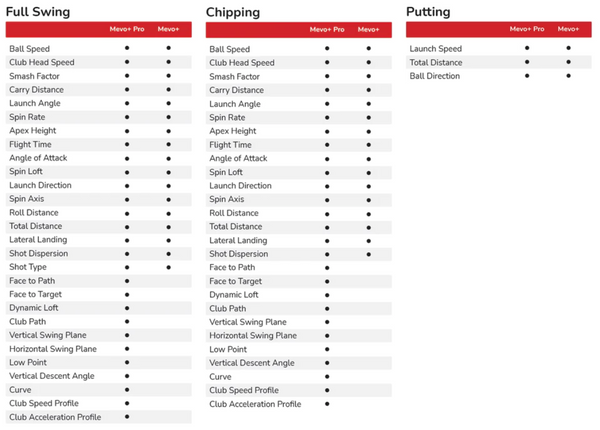
Mevo+ delivers 20 key data parameters for full swing, chipping, and putting—offering a powerful blend of game improvement and entertainment features.
Upgrade to the Mevo+ Pro Package to gain access to 40+ total data points, including advanced D-Plane metrics for full swings and chips. This includes face-to-path, face-to-target, dynamic loft, club path, low point, and more essential performance insights.
Space Requirements
Mevo+ Full Swing Setup Requirements
-
Minimum Distance (Tee to Impact Screen): 8'
-
Recommended Distance (Ball Flight): 8'–13'
-
Mevo+ Sensor to Tee Distance: 8'
Mevo+ Short Game Setup Requirements
Putting:
-
Minimum Distance (Tee to Cup): 6'
-
Maximum Distance (Tee to Cup): 30'
-
Mevo+ Sensor to Tee Distance: 7'
-
Flat surface required
-
No aluminum stickers needed
-
12° tilt required
Limited Flight Chipping:
-
Minimum Distance (Tee to Target): 8'
-
Mevo+ Sensor to Tee Distance: 8'
-
Aluminum stickers not needed if using Titleist RCT balls
Full Flight Chipping:
-
Minimum Distance (Tee to Target): 6'
-
Maximum Distance (Tee to Target): 50 yds max
-
Mevo+ Sensor to Tee Distance: 8'
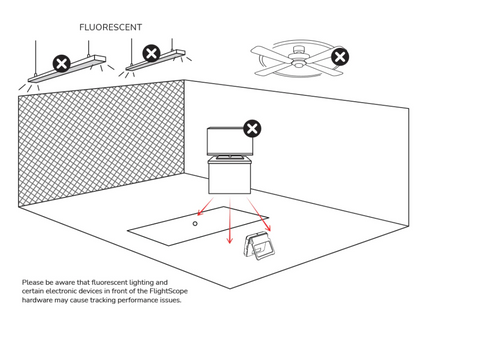
Environment Requirements:
Specifications
Mevo+ Specifications
-
Dimensions: 8.2" x 8" x 2.4"
-
Weight: 16 oz
-
Battery Type: 1 Lithium Polymer (included)
-
Battery Life: Up to 3 hours
System Requirements
iPhone & iPad Requirements:
Android Requirements:
Resources
Documents:
Shipping Time
Processing Time:
All orders are processed within 1–2 business days, depending on stock availability.
Delivery Time:
Standard delivery typically takes 2–5 business days, subject to product availability and carrier timelines.
Pre-orders:
Estimated shipping times are displayed on each product page. Please note that pre-orders may take longer to ship than in-stock items.
Tracking Information:
Once your order has been shipped, you’ll receive an email with tracking details so you can monitor your delivery status.
How to Check Order Status:
To check your order status, email us at info@indoorgolfessentials.com with your 5-digit order number. You may also call or text us at 571-500-8371 for assistance.
NOTE: Delivery times are subject to change and may vary based on carrier delays or other circumstances beyond our control. If any changes occur, we will make every effort to notify you promptly.
Returns & Refunds
Return Policy:
You may return the Mevo+ within 7 days of receipt, provided the product is unused, undamaged, and includes all original packaging and accessories.
Restocking Fee:
A 15% restocking fee applies to all approved returns. Customers are responsible for all return shipping costs.
Return Process:
-
Contact Us: Email info@indoorgolfessentials.com to initiate your return request.
-
Provide Details: Include your 5-digit order number and photos of all items you wish to return.
-
Approval Required: All returns must be approved by the manufacturer. Once approved, we will provide you with the return shipping address.
-
Refund Process: After the items are received and inspected, your refund will be issued to the original payment method.
Cancellations:
- Orders must be canceled within 24 hours to avoid a 3% merchant processing fee.
- To cancel an order, please email info@indoorgolfessentials.com as soon as possible.
- If the order has already shipped, the customer is responsible for return shipping costs and the 3% processing fee.